Sunday, 20 April 2014

[SSRS] 101 SQL Server Reporting Services Interview Questions with Answers

[SSRS] 101 SQL Server Reporting Services Interview Questions with Answers

Written by Super User. Posted in SSRS

In this post, I am going to walk you thru SQL Server Reporting Services Interview Questions from
· GENERAL | BASICS | Introduction
· DBA (Production Support) Prospective
· DBA + Developer Common Questions
· Developer (Report Designer) Prospective
· Solution Architect prospective
· IT Manager prospective

GENERAL Questions SSRS Interview Questions
What is SQL Server Reporting Services?
Reporting Services helps business to Transform raw data (table data) into graphical like chart, histogram etc. to add meaning to raw data.
For example, the table below having a data but the moment that data was presented in chart, that added more business meaning to data.
clip_image001
SQL Server Reporting Services can query and display data from any of the multiple databases and represent in a way which is more understandable to users.
What are the tools available in market as an Alternative to SQL Server Reporting Services / (Business Intelligence tools) ?
Market is full of business intelligence tools here are few listed of them,
Actuate Hyperion (BRIO) SIEBEL-CRM
BusinessObjects Oracle Express OLAP Qlikview
Cognos Informatica Power Analyzer Proclarity
IntelliView Dundas Chart for .NET MS-Excel
SAS MicroStrategies Pentaho
Open Source solutions
· Jasper Reports
· JFreeReport
· BIRT (Business Intelligence Reporting Tools)
· OpenReport
· DataVision
· Pentaho
What is reporting lifecycle ?
Reporting Services has three mainly three phases
1. Development of Reports (Developer) – First of all a report needs to be design which is primarily done by report developer
2. Management of Reports (DBA) – Once the Report is being developed, DBA need to ensure
1. Security – Only authorized user should access the report
2. Execution – How the report will be executed to optimize data sources performance
3. Scheduling of reports – so that report are executed on scheduled timings
3. Report Delivery (DBA+Developer) – Once the report is being developed and executed now the report should be reached to final recipients (business users) who are going to understand / analyze report data. if any changes, we again go back to development stage.
What is Reporting Services Architecture ?
Reporting Services is a .NET framework-based platform that includes a comprehensive tools that we can use to integrate reporting solution into any centrally-managed environment. CLICK HERE(http://goo.gl/LwBRj) for more details
What can we do with SQL Server Reporting Services ?
Reporting Services can help you in building and deploying fully interactive scorecards, dashboards, and enterprise reports.
SQL Server Reporting Services Feature
· Design ad-hoc dashboards and reports quickly
· Data is interactive and available everywhere even on your IPAD / IPHONE.
· This is bundle product with SQL Server database services, so there is additional cost for this service.
· .Net integrated for rapid development for report even in few clicks by using wizards.
By using Reporting Services, we can build up a solution which is kind of Google maps, where we can list our all business locations.
Check out video post to learn, “How to Integrate Map with SQL Server Reporting Services
What are the New Features of SQL Server 2008 R2 Reporting Services ?
Lot of new features were added in SQL Server 2008 R2, like
· New Report Types – Table, Matrix, List, Chart, Sub report
· New Tools added to report designer Toolbox
· Report Data Panel -  built in page numbers
· Report Builder 3.0
For details for new feature of SQL Server 2008 R2, please check my previous post, “SQL Server Reporting Services R2 – New Features
What are the new features are introduced in SQL Server 2012 reporting services?
SQL Server 2012 has introduced a couple of new features like
· Power View - interactive data exploration
· SQL Server 2012 is fully integrated with SharePoint
· Introduction to Data Alerts, data alerts are a data-driven alerting solution that informs you about changes in report data that are of interest to you, and at a relevant time
· SQL Server Data tool
· new rendering extensions supports MS Office 2010
· Project Crescent is being introduced
DBA (Production Support) Prospective
What are the tasks which are mainly performed by a production DBA on a SQL Server Reporting Services ?
Operational support DBA are mainly responsible for
· Install and Configure reporting services
· Backing up Reporting Services (including databases, config files and encryption keys)
· Deploying new reports
· create and manage shared data sources
· Optimizing reports – Enable caching of reports
· Authorize users for reports
· Create and deploy security roles.
· Check Reporting Services Error Logs for errors
· Maintain response time of reporting services
Can we run Reporting Services with SQL Server Express Edition, which is a free version of SQL Server ?
Yes, SQL Server Express Edition with Advanced Services support Reporting Services. we can use SQL Server Express Edition for deploying reporting Services.
What are the limitations in Reporting Services on SQL Server Express Edition ?
Microsoft offers reporting services free as part of SQL Server Express with Advance Services edition but following restrictions will be applicable to this edition.
· SQL Server Management Studio Express cannot be used to administer report server
· Report Models will not be available
· Other features like Caching, History and Delivery of Report is not available.
· Report Builder is not available
· Local SQL Server is a only option, which can be used as Report Data Source.
· We cannot store the report server database on a remote server, it has to be local only.
· Reports can be rendered only in Excel, PDF, Image formats only
· No SQL Server agent is available, so no scheduling is possible.
· Reporting Services will not be able to use more than 1 GB of RAM
· No Subscriptions (Standard and Data Driven) can be made
· Can not be integrated with Share Point
· Only named instances is supported
· Scale-out Report Servers will not be available
· Can not implement Role based security.
How to Install SQL Server Express with Reporting Services ?
For Step by Step instructions, Please check my previous post, “How to Install SQL Server Express with Reporting Services
What are the parameters which should be considered for Reporting Services Disk storage requirement ?
There are various factors to be considers as a primary I would consider
1. Number of reports to be hosted server
2. Report size and frequency of reports
3. Number of snapshots to be saved
Can I configure SQL Server Reporting Services on a Windows cluster for High availability ?
Please check my previous post, “Installing & Configuring SQL Server Reporting Services on Cluster Environment for High Availability” to understand how reporting services works on cluster.
What is ReportServer and ReportServerTempDB ?
Reporting Services uses two SQL Server databases for storage by default, the databases are namedReportServer and ReportServerTempdb.
ReportServer is a main database, which store all internal configuration and report meta data where asReportServerTempdb is used to store temporary data, session information, and cached reports.
How to backup SQL Server Reporting Services ?
There are mainly three things, which should be backed up as part of reporting services backup
1. Report Server Databases, which can be backed up by SQL server backup and restore method. Check my previous Video post, “HOW to BACKUP SQL
2. SQL Server Reporting Services Configuration, SQL Server Reporting Services Configuration is saved in config files, which can be copied as part of backup. look for other to know config files and there location.
3. Encryption Keys backup , use SQL Server Reporting Services Configuration tool to backup symmetric keys.
What is encryption key ?
Encryption keys are used by the report server so that items such as connection strings are maintained securely. these keys are required in case you want to perform restoration of report server databases.
How to backup encryption key ?
Encryption Keys backup , use SQL Server Reporting Services Configuration tool to backup symmetric keys.
Can we install a 32-bit version of SQL Server Reporting Services on a computer that is running a 64-bit version of Windows?
YES, we can install SQL Server 32 bit on Windows 64 bit version. SQL Server Reporting services are part of SQL Server.
Where the SQL Server Reporting Configuration is saved, is that in registry ?
NO, all SQL Server configuration is saved in configuration files (.xml files)
What are the key configuration files for SQL Server Reporting Services ?
Mostly all Configuration files located at Install Directory\Microsoft SQL Server
\<SQL Server Instance>\Reporting Services\ReportServer and  ReportManager
· RSReportServer.config stores configuration settings for feature areas of the Report Server service: ReportManager, the Report Server Web service, and background processing.
· RSSrvPolicy.config stores code access security policies for the server extensions.
· RSMgrPolicy.config stores code access security policies for Report Manager
· ReportingServicesService.exe.config stores configuration settings that specify the trace levels and logging options for the Report Server service.
Other Files
· RSReportDesigner.config contains settings for Report Designer and this file is located in the..\Program Files\Visual Studio 9.0\Common7\IDE\PrivateAssemblies
· RSPreviewPolicy.config stores server extensions used during report preview and this file is located in ..\Program Files \Microsoft SQL Server\100\Tools \ReportDesigner
What are the mostly used PERFMON Counters for monitoring SQL Server Reporting Services?
This is bit tricky and everyone has his own answer, but I personally choose the following at least
· ReportServer: Service Performance Object \ Active Connections
· ReportServer: Service Performance Object \ Report Executed per second
· ReportServer: Service Performance Object \ Total Cache Hits
· ReportServer: Service Performance Object \ Total Requests
· Web Service \ Deliveries per second
· Web Service \ Total processing failures
What all should be backed as part of reporting Services ?
1. Report server databases (ReportServer and ReporterverTempdb)
2. Encryption keys and
3. Configuration Files (xml files)
1. RSReportServer.config,
2. RSSrvPolicy.config,
3. RSMgrPolicy.config,
4. ReportingServicesService.exe.config,
5. RSReportDesigner.config and
6. RSPreviewPolicy.config
How to backup up Encryption Keys?
Use SQL Server Reporting Services Configuration tool to backup symmetric keys
Questions for Developer as well as Developers (depends on profile)
What are the tools which are being offered by Microsoft SQL Server for Developers?
· Report Designer, used to develop reports in Business Intelligence Development Studio (BIDS) and then publish them to a Report Server
· Model Designer, used create a report model that Report Builder users uses to help them build on-demand reports.
· Report Builder – used to build reports without having to understand the underlying data source structures in the database
Note – These are built in tools with Microsoft SQL Server, there is no additional cost for using these tools.
What are the tools which are being offered by Microsoft SQL Server for DBA’s?
· Report Manager – a web-based report access and management tool to browse existing reports, upload new reports, and other properties like execution properties, security, and subscriptions.
· Reporting Services Configuration –used to configure a report server like report server databases, SMTP server and services properties.
· SQL Server Management Studio (SSMS) -  an alternative to Report Manager, which is primarily being used by DBA’s for managing reports.
Note – These are built in tools with Microsoft SQL Server, there is no additional cost for using these tools.
How to deploy reports ?
Reports can be deployed by using BIDS (Business Intelligence development Studio ) or by Report Manager which is web based application. Please see previous post, “How to deploy report to SQL Server Reporting Services
Can I deploy a report at multiple servers at one go ?
NO, native SQL Server Reporting services doesn’t supports this functionality but we can deploy reports directly to multiple servers at one go but this functionality is not built in, we need to buy some third party tools.
What is Report Builder ?
Report builder is used to create small reports and it a define interface. You can’t change the report interface in report builder it pre designed. You can just drag columns in the report.
Report builder creates reports on database objects available with report model project. Please check my previous Video post, ”How to Install Report Builder 3.0
What is report rendering ?
Exporting a report data with design o different type of file types is knows as Report rending. SQL Server Reporting Services supports multiple rendering extensions like Word, Excel, CSV, PDF, HTML etc.
Can I disable | restrict SQL Server Reporting Services Export Formats (Rendering Formats) ?
YES, we can restrict Reporting services export formats.
SQL Server Reporting Services (SSRS) supports export to different formats like XML, CSV, HTML, PDF, etc., when you view the report.  This export option is available at report viewer Export drop-down list.
We can control this via report services server configuration file which is available at “C:\Program Files\Microsoft SQL Server\MSSQL.2\Reporting Services\Report Server\ rsreportserver.config“.
For More details, please check my previous post “How to Disable/restrict SSRS Export format ?
How to migrate SQL Server 2008 Reporting Services to another computer?
If you are trying to migrate only SQL Server reporting services to new server, then we have an option to install reporting services on new server and while configuring report server, we can point report server services to old report database database.
Or incase, you are trying to migrate report server databases and reporting service together, the install reporting services on new instance and restore configuration files  and restore report server databases and reconfigure the report server services.
How to check how frequent report is being called ?
Check Report history either from SSMS or Report manager. In report manager, go to report and select history tab. check here for more details
What is Report Caching ?
Report caching is a performance enhancing technique in Reporting Services that saves copies of reports for faster viewing. Cached instances have an expiration time set to force a refresh of the data set used
for the report.
In case you have filters in your report, when filters will be applied in Cached Report instance ?
Filters are applied when a report is rendered, Filters will not create a new cached instance on the Report Server.
What is report snapshot ?
Snapshot means a instance of a report for future reference, that means a copy of report (data is freezed) will be saved on a report server for future reference.
What is Data Driven Subscription ?
Subscriptions are used to deliver rendered reports to business users at specified schedule. For example, a sales report should go to sales manager daily at 7:00 AM for last day report. This is kind of pushing reports on a schedule. By creating subscription, we can send reports to users in e-mail or Deliver to a file share
or can put report in Microsoft Office SharePoint server
A data-driven subscription can deliver a report in many rendered formats to many destinations. For example, USER1 wants report in XML format and USER 2 wants in a pdf format and user 3 wants in word but that too on a shared drive.
To meet these objective we can use Data-driven subscriptions as data driven  subscription require a database table to store all these report values so that these values can be used during processing.
How to upgrade report from SQL Server 2005 to SQL Server 2008?
SQL Server Setup is used to upgrade SQL Server Reporting Services. Run the SQL Server 2008 setup on existing SQL Server 2005 and opt for upgrade.
Developer (Report Designer) Prospective
Any Idea, how to to build / design Report using Visual Studio?
Building Reports using Visual Studio is quite easy, Please check my previous Video POST, “How to create a report using Visual Studio 2008?” which describes
1. how to build a report using Visual Studio 2008
2. deploy report to SQL Server Reporting Services
3. How to create an shared data sources
4. How to design a report
5. How to add interactive sorting Change
6. Run the report in SSRS
What is Parameterized Reports in SSRS ?
You often need more advanced reporting such as drop down lists and the ability to use parameters when working in Sql Server Reporting Services. Please check VIDEO Tutorial, “How to make Parameterized Reports in SSRS”  which describes,
· How to use variables that have not been declared in SSRS vs TSQL
· How to create report with auto-Parameterization
· How to View Report Parameters
· How to create a drop-down list
What are different types of reports are available ?
There is as such not any type of of reports, but we can categories them as
Tabular Report – where we represent data in rows and columns format. (Now this is non as Tablix which is mixture of table and a matrix)
CHART REPORTS – where we represent the data in graphical format mainly in charts?
further more these reports can fetch data either from relational database (TSQL REPORTS category) or from CUBES (MDX Reports)
What sort of query we can write in SSRS, is that just SQL / TSQL or is there anything else too?
· MDX – for OLAP / CUBE data sources
· DMX – for data mining
Can you edit a report that an end user created by using Report Builder in BIDS?
Yes, if an end user created a report by using Report Builder in BIDS and saved the report definition file, you can open the file in BIDS and edit it.
What is Sub report ?
SUB report is very helpful when the detail of a report’s data region is so complex that a separate report is a better option then using other tools.
Can sub report data source be different from that of the parent report ?
YES, sub report data source can be different from that of the parent report.
What are the various ways to deploy reports ?
Reports can be deployed to report server by using any of the following method
· BIDS
· Computer Management console
· .nET START command
· SSMS
· Report Manager
but normally BIDS  and Report managers are mostly used.
Can we use Analysis Services Database as a data source with Model Designer ?
NO, Model Designer doesn’t access data from Analysis Services cubes.
What is report subscription?
Subscriptions are standing requests to deliver report data to requested recipients. Once the report is being subscribed and subscriber will get updates from report server on scheduled interval.
What is the RDL file?
RDL stands for Report Definition Language, when we design a report using any tool like BIDS and when we save the report, it’s saved as .rdl file, RDL file is an kind of xml code, which stores the design of the report.
This RDL file is being used  for deploying report to report server.
Can you use a stored procedure to provide data to an SSRS report?
Yes, you can use a stored procedure. However, your stored procedure should return only a single result set. If it returns multiple result sets, only the first one is used for the report dataset.
How to deploy Reports on SQL Server Reporting Services ?
Please check my previous VIDEO post to learn, Step by Step Learning, How to deploy report to SQL Server Reporting Services 2008
How can I build my first report which is ready to deploy in SQL Server Reporting Services ?
Please check my previous blog post, Introduction to SQL Server Reporting Services, for a brief video tutorial for SQL Server Report designer.
Solution Architect prospective
IT Manager prospective
Can we run Reporting Services with SQL Server Express Edition, which is a free version of SQL Server ?
Yes, SQL Server 2005 Express Edition with Advanced Services support Reporting Services. we can use SQL Server Express Edition for deploying reporting Services. For more details to know SQL Server Express Limitations, please check my previous post, “What are the limitations in Reporting Services on SQL Server Express Edition
Is there any free tools to build reports ?
YES, there are log of open source code solution are available, which can used to design reports, here are few listed.
· Jasper Reports
· JFreeReport
· BIRT (Business Intelligence Reporting Tools)
· OpenReport
· DataVision
· Pentaho
What are the product alternatives to SQL Server Reporting Services ?
Market of full of tools and here are few of them
Actuate Hyperion (BRIO) SIEBEL-CRM
BusinessObjects Oracle Express OLAP Qlikview
Cognos Informatica Power Analyzer Proclarity
IntelliView Dundas Chart for .NET MS-Excel
SAS MicroStrategies Pentaho
How many instances of Reporting Services can be managed by a single DBA ?
This is pretty tricky questions, and there is not any single formula to decide this. This all depends on what sort of monitoring tools you have and what sort of automation you have achieved.
But as per my understanding and calculations a single 3-7 year experience DBA without any third party tool can easily deploy 25-35 report in a day, which is one time activity for most of the organizations and DBA can easily monitor / provide production support to 25-40 instances of SQL Server, which included daily
· Monitor Event Viewers
· Check SQL Server Errors
· Check Reporting Services Logs
· Monitor Perfmon counters
· Backup all databases
· check schedule sql jobs etc.
but I believe, without any tool (just using manual / Script) we can assume 1 DBA for every 25 servers is ideal number to focus more on preventive actions rather then corrective actions.
Is my data is safe, What all we are backing up for SQL Server Reporting Services ?
There are mainly three things, which should be backed up as part of reporting services backup
1. Report Server Databases, which can be backed up by SQL server backup and restore method. Check my previous Video post, “HOW to BACKUP SQL
2. SQL Server Reporting Services Configuration, SQL Server Reporting Services Configuration is saved in config files, which can be copied as part of backup. look for other to know config files and there location.
3. Encryption Keys backup , use SQL Server Reporting Services Configuration tool to backup symmetric keys.
What is the licensing cost for SQL Server Report Server?
SQL Server Reporting Services is bundled with SQL Server. So in case you have already purchased SQL Server Standard edition for your business then there is no additional cost for using this SQL Server Reporting Services.
Do I need to buy separate licenses for users who view reports ?
NO, there is no separate licenses for report delivery or viewing report on demand, i’’s all bundelled in SQL Server with once license cost.
Is there any free edition where I can use SQL Server Reporting Services ?
Yes, SQL Server 2005 Express Edition with Advanced Services support Reporting Services but there are several limitation, check my post,”What are the limitations in Reporting Services on SQL Server Express Edition for these limitations.

Source : http://www.sqlserver-training.com

Thursday, 6 March 2014

Repeat Header / Keep Header Visible in Tables in RS 2008

Repeat Header / Keep Header Visible in Tables in SSRS 2008

 You selected "Repeat header rows on each page" or "Keep header rows visible while scrolling" in the tablix properties dialog, but it doesn't seem to work as expected?  You might want to try the following four steps if you are using a "table"-style layout:
  1. in the grouping pane, click on the small triangle and select "Advanced Mode" to show static members:
    Grouping pane in advanced mode
     
  2. verify that you have the properties grid turned on (in BI Development Studio use F4, in Report Builder go to the "View" tab and select "Properties")
     
  3. select the corresponding (static) item in the row group hierarchy
     
  4. in the properties grid:
    - set KeepWithGroup to After
    - set RepeatOnNewPage to true for repeating headers
    - set FixedData to true for keeping headers visible
Please read on if you are interested in more details and ever wondered about the meaning of double-dashed lines on the design surface.  In short, double-dashed lines show the row group, column group, corner, and tablix body areas of a data region.  In the "matrix"-style example shown below, the yellow area represents the corner of the tablix, the light blue areas are row group headers, dark blue areas denote column group headers.  The settings under "Row Headers" and "Column Headers" in the tablix properties dialog only apply to the row and column group areas (i.e. the blue areas on the left / above the double dashed lines).
Matrix design surface with row and column group headers
If you have a "table"-style layout however, then the row/column group areas are often empty as you are using "headerless" table-style groupings.  In that case, you have to set the properties as explained above to make entire static members (rows / columns) repeat / visible.

Friday, 17 January 2014

pagemethods-in-asp-net

ASP.NET Page Methods with Parameters

In earlier post I have written how we can use page methods to call server-side from the java script. In this post I am going to explain How we can pass parameters to page methods with java script.
So let’s take a simple example to see how we can pass parameters to the page methods. I am going to create a page method Hello World which takes name as parameter and return a string to greet user from that page method below is code for that.
?
8
9
10
11
12
13
14
15
16
17
18
19
20
21
using System;
using System.Web.Services;
namespace PageMethods
{
    public partial class Test : System.Web.UI.Page
    {
       [WebMethod]
       public static string HelloWorld(string name)
       {
           return string.Format("Hi {0}",name);
       }
    }
}
As you can see in following page method it’s returning string with greetings. So now our server-side code is completed. Now it’s time to write HTML and java script code for this. Following is code for java script.
?
8
9
10
11
12
13
14
15
16
17
18
19
20
<script type="text/javascript">
    function GreetingsFromServer() {
        var name = 'Jalpesh';
        PageMethods.HelloWorld(name,OnSuccess, OnError);
        return false;
    }
    function OnSuccess(response) {
        alert(response);
    }
    function OnError(error) {
        alert(error);
    }
</script>
As you can see in above code I have created a function called ‘GreetingsFromServer’ which called page method helloworld with passing name parameter. Other two functions are handlers for the page methods Onsucess will be called if page method is called successfully without error other wise it will call onError method and alert error message.
Now we are done with java script so its time to write HTML code. So let’s write a HTML code for this page.
?
8
9
10
11
12
13
14
15
16
17
18
19
20
21
22
23
24
25
26
<%@ Page Language="C#" AutoEventWireup="true" CodeBehind="Test.aspx.cs" Inherits="PageMethods.Test" %>
<!DOCTYPE html PUBLIC "-//W3C//DTD XHTML 1.0 Transitional//EN" "http://www.w3.org/TR/xhtml1/DTD/xhtml1-transitional.dtd">
<head runat="server">
    <title>Page Method with parameter demo</title>
</head>
<body>
    <form id="form1" runat="server">
    <div>
        <asp:ScriptManager runat="server" EnablePageMethods="true" EnablePartialRendering="true">
        </asp:ScriptManager>
        <asp:button ID="btnHelloWorld" runat="server" Text="Greet User" OnClientClick="return GreetingsFromServer();"/>
    </div>
    </form>
</body>
</html>
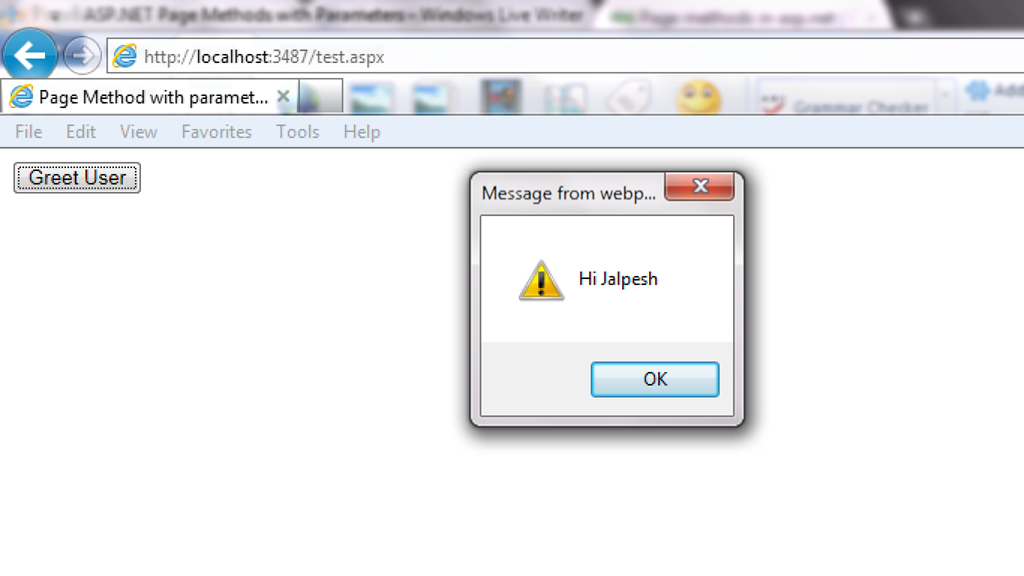
As you can see from above code I have enabled page methods true with script manager  and then  I have called JavaScript function “GreetingsFromServer” on button client click. So it’s now time to run this code in browser. Following is output as expected.
PageMethodWithParameter
That’s it. It’s very easy hope you liked it..Stay tuned for more…Happy programming

http://weblogs.asp.net/jalpeshpvadgama/archive/2012/01/07/asp-net-page-methods-with-parameters.aspx

Wednesday, 1 January 2014

Table of Contents

Can you explain ASP.NET application and page life cycle-(Demo, in which event we should do what) Part 3?

Introduction

In this article, we will try to understand what the different events are which take place right from the time the user sends a request, until the time the request is rendered on the browser. So we will first try to understand the two broader steps of an ASP.NET request and then we will move into different events emitted from ‘HttpHandler’, ‘HttpModule’ and ASP.NET page object. As we move in this event journey, we will try to understand what kind of logic should go in each and every one of these events.
This is a small Ebook for all my .NET friends which covers topics like WCF, WPF, WWF, Ajax, Core .NET, SQL, etc. You can download the same from here or else you can catch me on my daily free training here.

The Two Step Process

From 30,000 feet level, ASP.NET request processing is a 2 step process as shown below. User sends a request to the IIS:
  • ASP.NET creates an environment which can process the request. In other words, it creates the application object, request, response and context objects to process the request.
  • Once the environment is created, the request is processed through a series of events which is processed by using modules, handlers and page objects. To keep it short, let's name this step as MHPM (Module, handler, page and Module event), we will come to details later.

In the coming sections, we will understand both these main steps in more detail.

Creation of ASP.NET Environment

Step 1: The user sends a request to IIS. IIS first checks which ISAPI extension can serve this request. Depending on file extension the request is processed. For instance, if the page is an ‘.ASPX page’, then it will be passed to ‘aspnet_isapi.dll’ for processing.

Step 2: If this is the first request to the website, then a class called as ‘ApplicationManager’ creates an application domain where the website can run. As we all know, the application domain creates isolation between two web applications hosted on the same IIS. So in case there is an issue in one app domain, it does not affect the other app domain.

Step 3: The newly created application domain creates hosting environment, i.e. the ‘HttpRuntime’ object. Once the hosting environment is created, the necessary core ASP.NET objects like ‘HttpContext’ , ‘HttpRequest’ and ‘HttpResponse’ objects are created.

Step 4: Once all the core ASP.NET objects are created, ‘HttpApplication’ object is created to serve the request. In case you have a ‘global.asax’ file in your system, then the object of the ‘global.asax’ file will be created. Please note global.asax file inherits from ‘HttpApplication’ class.
Note: The first time an ASP.NET page is attached to an application, a new instance of ‘HttpApplication’ is created. Said and done to maximize performance, HttpApplication instances might be reused for multiple requests.

Step 5: The HttpApplication object is then assigned to the core ASP.NET objects to process the page.

Step 6: HttpApplication then starts processing the request by HTTP module events, handlers and page events. It fires the MHPM event for request processing.
Note: For more details, read this.

The below image explains how the internal object model looks like for an ASP.NET request. At the top level is the ASP.NET runtime which creates an ‘Appdomain’ which in turn has ‘HttpRuntime’ with ‘request’, ‘response’ and ‘context’ objects.

Process Request using MHPM Events Fired

Once ‘HttpApplication’ is created, it starts processing requests. It goes through 3 different sections ‘HttpModule’ , ‘Page’ and ‘HttpHandler’. As it moves through these sections, it invokes different events which the developer can extend and add customize logic to the same.
Before we move ahead, let's understand what are ‘HttpModule’ and ‘HttpHandlers’. They help us to inject custom logic before and after the ASP.NET page is processed. The main differences between both of them are:
  • If you want to inject logic based in file extensions like ‘.ASPX’, ‘.HTML’, then you use ‘HttpHandler’. In other words, ‘HttpHandler’ is an extension based processor.
  • If you want to inject logic in the events of ASP.NET pipleline, then you use ‘HttpModule’. ASP.NET. In other words, ‘HttpModule’ is an event based processor.
You can read more about the differences from here.
Below is the logical flow of how the request is processed. There are 4 important steps MHPM as explained below:

Step 1(M: HttpModule): Client request processing starts. Before the ASP.NET engine goes and creates the ASP.NET HttpModule emits events which can be used to inject customized logic. There are 6 important events which you can utilize before your page object is created BeginRequest, AuthenticateRequest, AuthorizeRequest, ResolveRequestCache, AcquireRequestState and PreRequestHandlerExecute.

Step 2 (H: ‘HttpHandler’): Once the above 6 events are fired, ASP.NET engine will invoke ProcessRequest event if you have implemented HttpHandler in your project.

Step 3 (P: ASP.NET page): Once the HttpHandler logic executes, the ASP.NET page object is created. While the ASP.NET page object is created, many events are fired which can help us to write our custom logic inside those page events. There are 6 important events which provides us placeholder to write logic inside ASP.NET pages Init, Load, validate, event, render and unload. You can remember the word SILVER to remember the events S – Start (does not signify anything as such just forms the word) , I – (Init) , L (Load) , V (Validate), E (Event) and R (Render).

Step4 (M: HttpModule): Once the page object is executed and unloaded from memory, HttpModule provides post page execution events which can be used to inject custom post-processing logic. There are 4 important post-processing events PostRequestHandlerExecute, ReleaserequestState, UpdateRequestCache and EndRequest.
The below figure shows the same in a pictorial format.

In What Event Should We Do What?

The million dollar question is in which events should we do what? Below is the table which shows in which event what kind of logic or code can go.
Section Event Description
HttpModule BeginRequest This event signals a new request; it is guaranteed to be raised on each request.
HttpModule AuthenticateRequest This event signals that ASP.NET runtime is ready to authenticate the user. Any authentication code can be injected here.
HttpModule AuthorizeRequest This event signals that ASP.NET runtime is ready to authorize the user. Any authorization code can be injected here.
HttpModule ResolveRequestCache In ASP.NET, we normally use outputcache directive to do caching. In this event, ASP.NET runtime determines if the page can be served from the cache rather than loading the patch from scratch. Any caching specific activity can be injected here.
HttpModule AcquireRequestState This event signals that ASP.NET runtime is ready to acquire session variables. Any processing you would like to do on session variables.
HttpModule PreRequestHandlerExecute This event is raised just prior to handling control to the HttpHandler. Before you want the control to be handed over to the handler any pre-processing you would like to do.
HttpHandler ProcessRequest Httphandler logic is executed. In this section, we will write logic which needs to be executed as per page extensions.
Page Init This event happens in the ASP.NET page and can be used for:
  • Creating controls dynamically, in case you have controls to be created on runtime.
  • Any setting initialization.
  • Master pages and the settings.
In this section, we do not have access to viewstate, postedvalues and neither the controls are initialized.
Page Load In this section, the ASP.NET controls are fully loaded and you write UI manipulation logic or any other logic over here.
Page Validate If you have valuators on your page, you would like to check the same here.

Render It’s now time to send the output to the browser. If you would like to make some changes to the final HTML which is going out to the browser, you can enter your HTML logic here.
Page Unload Page object is unloaded from the memory.
HttpModule PostRequestHandlerExecute Any logic you would like to inject after the handlers are executed.
HttpModule ReleaserequestState If you would like to save update some state variables like session variables.
HttpModule UpdateRequestCache Before you end, if you want to update your cache.
HttpModule EndRequest This is the last stage before your output is sent to the client browser.

A Sample Code for Demonstration

With this article, we have attached a sample code which shows how the events actually fire. In this code, we have created a ‘HttpModule’ and ‘Httphandler’ in this project and we have displayed a simple response write in all events, below is how the output looks like.
Below is the class for ‘HttpModule’ which tracks all events and adds it to a global collection.
public class clsHttpModule : IHttpModule
{
...... 
void OnUpdateRequestCache(object sender, EventArgs a)
{
objArrayList.Add("httpModule:OnUpdateRequestCache");
}
void OnReleaseRequestState(object sender, EventArgs a)
{
objArrayList.Add("httpModule:OnReleaseRequestState");
}
void OnPostRequestHandlerExecute(object sender, EventArgs a)
{
objArrayList.Add("httpModule:OnPostRequestHandlerExecute");
}
void OnPreRequestHandlerExecute(object sender, EventArgs a)
{
objArrayList.Add("httpModule:OnPreRequestHandlerExecute");
}
void OnAcquireRequestState(object sender, EventArgs a)
{
objArrayList.Add("httpModule:OnAcquireRequestState");
}
void OnResolveRequestCache(object sender, EventArgs a)
{
objArrayList.Add("httpModule:OnResolveRequestCache");
}
void OnAuthorization(object sender, EventArgs a)
{
objArrayList.Add("httpModule:OnAuthorization");
}
void OnAuthentication(object sender, EventArgs a)
{

objArrayList.Add("httpModule:AuthenticateRequest");
}
void OnBeginrequest(object sender, EventArgs a)
{

objArrayList.Add("httpModule:BeginRequest");
}
void OnEndRequest(object sender, EventArgs a)
{
objArrayList.Add("httpModule:EndRequest");
objArrayList.Add("<hr>");
foreach (string str in objArrayList)
{
httpApp.Context.Response.Write(str + "<br>") ;
}
} 
}
Below is the code snippet for ‘HttpHandler’ which tracks ‘ProcessRequest’ event.
public class clsHttpHandler : IHttpHandler
{
public void ProcessRequest(HttpContext context)
{
clsHttpModule.objArrayList.Add("HttpHandler:ProcessRequest");
context.Response.Redirect("Default.aspx");
}
}
We are also tracking all the events from the ASP.NET page.
public partial class _Default : System.Web.UI.Page 
{
protected void Page_init(object sender, EventArgs e)
{

clsHttpModule.objArrayList.Add("Page:Init");
}
protected void Page_Load(object sender, EventArgs e)
{
clsHttpModule.objArrayList.Add("Page:Load");
}
public override void Validate() 
{
clsHttpModule.objArrayList.Add("Page:Validate");
}
protected void Button1_Click(object sender, EventArgs e)
{
clsHttpModule.objArrayList.Add("Page:Event");
}
protected override void Render(HtmlTextWriter output) 
{
clsHttpModule.objArrayList.Add("Page:Render");
base.Render(output);
}
protected void Page_Unload(object sender, EventArgs e)
{
clsHttpModule.objArrayList.Add("Page:UnLoad");
}}
Below is how the display looks like with all events as per the sequence discussed in the previous section.

Zooming ASP.NET Page Events

In the above section, we have seen the overall flow of events for an ASP.NET page request. One of the most important sections is the ASP.NET page, we have not discussed the same in detail. So let’s take some luxury to describe the ASP.NET page events in more detail in this section.
Any ASP.NET page has 2 parts, one is the page which is displayed on the browser which has HTML tags, hidden values in form of viewstate and data on the HTML inputs. When the page is posted, these HTML tags are created in to ASP.NET controls with viewstate and form data tied up together on the server. Once you get these full server controls on the behind code, you can execute and write your own login on the same and render the page back to the browser.

Now between these HTML controls coming live on the server as ASP.NET controls, the ASP.NET page emits out lot of events which can be consumed to inject logic. Depending on what task / logic you want to perform, we need to put this logic appropriately in those events.
Note: Most of the developers directly use the page_load method for everything, which is not a good thought. So it’s either populating the controls, setting view state, applying themes, etc., everything happens on the page load. So if we can put logic in proper events as per the nature of the logic, that would really make your code clean.
Seq Events Controls Initialized View state
Available
Form data
Available
What Logic can be written here?
1 Init No No No Note: You can access form data etc. by using ASP.NET request objects but not by Server controls.Creating controls dynamically, in case you have controls to be created on runtime. Any setting initialization.Master pages and them settings. In this section, we do not have access to viewstate , posted values and neither the controls are initialized.
2 Load view state Not guaranteed Yes Not guaranteed You can access view state and any synch logic where you want viewstate to be pushed to behind code variables can be done here.
3 PostBackdata Not guaranteed Yes Yes You can access form data. Any logic where you want the form data to be pushed to behind code variables can be done here.
4 Load Yes Yes Yes This is the place where you will put any logic you want to operate on the controls. Like flourishing a combobox from the database, sorting data on a grid, etc. In this event, we get access to all controls, viewstate and their posted values.
5 Validate Yes Yes Yes If your page has validators or you want to execute validation for your page, this is the right place to the same.
6 Event Yes Yes Yes If this is a post back by a button click or a dropdown change, then the relative events will be fired. Any kind of logic which is related to that event can be executed here.
7 Pre-render Yes Yes Yes If you want to make final changes to the UI objects like changing tree structure or property values, before these controls are saved in to view state.
8 Save view state Yes Yes Yes Once all changes to server controls are done, this event can be an opportunity to save control data in to view state.
9 Render Yes Yes Yes If you want to add some custom HTML to the output this is the place you can.
10 Unload Yes Yes Yes Any kind of clean up you would like to do here.

About the Source Code

This source code shows how the complete ASP.NET request cycle fires. You can download it from here.

References

I am not so smart to write this article by myself Wink | ;-) , lot of things I have plugged from the below articles.

Tuesday, 19 November 2013

XML and XSL Tutorial

 XML and XSL Tutorial with Example..


Tutorial1.xml

<?xml version="1.0" encoding="utf-8" ?>
<?xml-stylesheet type="text/xsl" href="tvshows.xsl" ?>
<TvShows>
<Shows>
  <name>Utaran</name>
  <release>2005</release>
  <enddate>2009</enddate>
  <network country="India">Star Plus</network>
  <poster href="http://www.cinejosh.com/gallereys/bollywood/normal/uttaran_serial_1000_episodes_completion_party_0911120942/uttaran_serial_1000_episodes_completion_party_0911120942_034.jpg"></poster>
  <viewers units="millions">7.82</viewers>
</Shows>
  <Shows>
    <name>Dance India Dance</name>
    <release>2006</release>
    <enddate>2013</enddate>
    <network country="India">Colors</network>
    <poster href="http://upload.wikimedia.org/wikipedia/en/thumb/4/45/Dance_India_Dance_Judges.jpg/290px-Dance_India_Dance_Judges.jpg"></poster>
    <viewers units="millions">15.82</viewers>
  </Shows>
  <Shows>
    <name>Kahaani Ghar Ghar Ki</name>
    <release>2007</release>
    <enddate>2013</enddate>
    <network country="India">Colors</network>
    <poster href="http://media.startv.in/newstream/star/starplus/kahani_ghar_ghar_ki/1651/kahani_ghar_ghar_ki_ep1651_300x200.jpg"></poster>
    <viewers units="millions">2.82</viewers>
  </Shows>

</TvShows>


TVShows.XSL  File

<?xml version="1.0" encoding="utf-8" ?>
<xsl:stylesheet version="1.0" xmlns:xsl="http://www.w3.org/1999/XSL/Transform">

  <xsl:output method="html"/>
  <xsl:template match="/">

    <html>
      <head>
        <title>TV Shows</title></head>
      <body>
        Version: <xsl:value-of select="system-property('xsl:version')"/><br />
        Vendor: <xsl:value-of select="system-property('xsl:vendor')"/><br />
        Vendor URL: <xsl:value-of select="system-property('xsl:vendor-url')"/><br />

        <xsl:for-each select="TvShows/Shows">

          <a href="#{generate-id(name)}">
            <xsl:value-of select="name"/>
          </a><br/>
    </xsl:for-each>


        <xsl:for-each select="TvShows/Shows">
          <xsl:sort select="name" order="ascending" data-type="text"/>
          <h3>
            <a name="{generate-id(name)}">
              <xsl:value-of select="name"/>
            </a>
          </h3>
          <img>
            <xsl:attribute name="src">
              <xsl:value-of select="poster/@href"/>
            </xsl:attribute>
          </img>
          <br/>

          <xsl:value-of select="current()"/> <br/>

          <p> The show <xsl:value-of select="name"/> was
          released in <xsl:value-of select="release"/> by
          <xsl:value-of select="network"/>. It had an average viewership
          of <xsl:value-of select="viewers"/> million people. It was
          cancelled in <xsl:value-of select="enddate"/>
        </p> <br/>
   </xsl:for-each>

        <table border="2">
          <tr><th>Name</th><th>Network</th><th>Viewers</th></tr>
          <xsl:for-each select="TvShows/Shows">
            <xsl:if test="release &lt; 2006">
              <tr bgcolor="red">
                <td><xsl:value-of select="name"/></td>
                <td><xsl:value-of select="network"/></td>
                <td><xsl:value-of select="viewers"/></td>
              </tr>
            </xsl:if>
              <xsl:choose>

                <xsl:when test="release>2006">
                  <tr bgcolor="yellow">
                      <td><xsl:value-of select="name"/></td>
                      <td><xsl:value-of select="network"/></td>
                      <td><xsl:value-of select="viewers"/></td>
                   </tr>
                </xsl:when>


                <xsl:when test="release=2006">
                  <tr bgcolor="orange">
                    <td><xsl:value-of select="name"/></td>
                    <td><xsl:value-of select="network"/></td>
                    <td><xsl:value-of select="viewers"/></td>
                  </tr>
                </xsl:when>
                <xsl:otherwise>
                  <tr bgcolor="pink">
                    <td><xsl:value-of select="name"/></td>
                    <td><xsl:value-of select="network"/></td>
                    <td><xsl:value-of select="viewers"/></td>
                  </tr>
             </xsl:otherwise>
              </xsl:choose>
           </xsl:for-each>
         
        </table>
       
      </body>
    </html>
   
  </xsl:template>
</xsl:stylesheet>


OUTPUT


Version: 1.0
Vendor: libxslt
Vendor URL: http://xmlsoft.org/XSLT/
Utaran
Dance India Dance
Kahaani Ghar Ghar Ki

Dance India Dance


Dance India Dance 2006 2013 Colors 15.82 
The show Dance India Dance was released in 2006 by Colors. It had an average viewership of 15.82 million people. It was cancelled in 2013

Kahaani Ghar Ghar Ki


Kahaani Ghar Ghar Ki 2007 2013 Colors 2.82 
The show Kahaani Ghar Ghar Ki was released in 2007 by Colors. It had an average viewership of 2.82 million people. It was cancelled in 2013

Utaran


Utaran 2005 2009 Star Plus 7.82 
The show Utaran was released in 2005 by Star Plus. It had an average viewership of 7.82 million people. It was cancelled in 2009

NameNetworkViewers
UtaranStar Plus7.82
UtaranStar Plus7.82
Dance India DanceColors15.82
Kahaani Ghar Ghar KiColors2.82


Sunday, 10 November 2013

COALESCE (Transact-SQL)

COALESCE (Transact-SQL)

SQL Server 2012
Evaluates the arguments in order and returns the current value of the first expression that initially does not evaluate to NULL.
Applies to: SQL Server (SQL Server 2008 through current version), Windows Azure SQL Database (Initial release through current release).
Topic link icon Transact-SQL Syntax Conventions

COALESCE ( expression [ ,...n ] ) 

expression
Is an expression of any type.
Returns the data type of expression with the highest data type precedence. If all expressions are nonnullable, the result is typed as nonnullable.
If all arguments are NULL, COALESCE returns NULL. At least one of the null values must be a typed NULL.

Comparing COALESCE and CASE

The COALESCE expression is a syntactic shortcut for the CASE expression. That is, the code COALESCE(expression1,...n) is rewritten by the query optimizer as the following CASE expression:
CASE
   WHEN (expression1 IS NOT NULL) THEN expression1
   WHEN (expression2 IS NOT NULL) THEN expression2
   ...
   ELSE expressionN
END
This means that the input values (expression1, expression2, expressionN, etc.) will be evaluated multiple times. Also, in compliance with the SQL standard, a value expression that contains a subquery is considered non-deterministic and the subquery is evaluated twice. In either case, different results can be returned between the first evaluation and subsequent evaluations.
For example, when the code COALESCE((subquery), 1) is executed, the subquery is evaluated twice. As a result, you can get different results depending on the isolation level of the query. For example, the code can return NULL under the READ COMMITTED isolation level in a multi-user environment. To ensure stable results are returned, use the SNAPSHOT ISOLATION isolation level, or replace COALESE with the ISNULL function. Alternatively, you can rewrite the query to push the subquery into a subselect as shown in the following example.
SELECT CASE WHEN x IS NOT NULL THEN x ELSE 1 END
FROM
(
SELECT (SELECT Nullable FROM Demo WHERE SomeCol = 1) AS x
) AS T;

Comparing COALESCE and ISNULL

The ISNULL function and the COALESCE expression have a similar purpose but can behave differently.
  1. Because ISNULL is a function, it is evaluated only once. As described above, the input values for the COALESCE expression can be evaluated multiple times.
  2. Data type determination of the resulting expression is different. ISNULL uses the data type of the first parameter, COALESCE follows the CASE expression rules and returns the data type of value with the highest precedence.
  3. The NULLability of the result expression is different for ISNULL and COALESCE. The ISNULL return value is always considered NOT NULLable (assuming the return value is a non-nullable one) whereas COALESCE with non-null parameters is considered to be NULL. So the expressions ISNULL(NULL, 1) and COALESCE(NULL, 1) although equivalent have different nullability values. This makes a difference if you are using these expressions in computed columns, creating key constraints or making the return value of a scalar UDF deterministic so that it can be indexed as shown in the following example.
    USE tempdb;
    GO
    -- This statement fails because the PRIMARY KEY cannot accept NULL values
    -- and the nullability of the COALESCE expression for col2 
    -- evaluates to NULL.
    CREATE TABLE #Demo 
    ( 
    col1 integer NULL, 
    col2 AS COALESCE(col1, 0) PRIMARY KEY, 
    col3 AS ISNULL(col1, 0) 
    ); 
    
    -- This statement succeeds because the nullability of the 
    -- ISNULL function evaluates AS NOT NULL.
    
    CREATE TABLE #Demo 
    ( 
    col1 integer NULL, 
    col2 AS COALESCE(col1, 0), 
    col3 AS ISNULL(col1, 0) PRIMARY KEY 
    );
    
  4. Validations for ISNULL and COALESCE are also different. For example, a NULL value for ISNULL is converted to int whereas for COALESCE, you must provide a data type.
  5. ISNULL takes only 2 parameters whereas COALESCE takes a variable number of parameters.

A. Running a simple example

The following example shows how COALESCE selects the data from the first column that has a nonnull value. This example uses the AdventureWorks2012 database.
SELECT Name, Class, Color, ProductNumber,
COALESCE(Class, Color, ProductNumber) AS FirstNotNull
FROM Production.Product;

B. Running a complex example

In the following example, the wages table includes three columns that contain information about the yearly wages of the employees: the hourly wage, salary, and commission. However, an employee receives only one type of pay. To determine the total amount paid to all employees, use COALESCE to receive only the nonnull value found in hourly_wage, salary, and commission.
SET NOCOUNT ON;
GO
USE tempdb;
IF OBJECT_ID('dbo.wages') IS NOT NULL
    DROP TABLE wages;
GO
CREATE TABLE dbo.wages
(
    emp_id        tinyint   identity,
    hourly_wage   decimal   NULL,
    salary        decimal   NULL,
    commission    decimal   NULL,
    num_sales     tinyint   NULL
);
GO
INSERT dbo.wages (hourly_wage, salary, commission, num_sales)
VALUES
    (10.00, NULL, NULL, NULL),
    (20.00, NULL, NULL, NULL),
    (30.00, NULL, NULL, NULL),
    (40.00, NULL, NULL, NULL),
    (NULL, 10000.00, NULL, NULL),
    (NULL, 20000.00, NULL, NULL),
    (NULL, 30000.00, NULL, NULL),
    (NULL, 40000.00, NULL, NULL),
    (NULL, NULL, 15000, 3),
    (NULL, NULL, 25000, 2),
    (NULL, NULL, 20000, 6),
    (NULL, NULL, 14000, 4);
GO
SET NOCOUNT OFF;
GO
SELECT CAST(COALESCE(hourly_wage * 40 * 52, 
   salary, 
   commission * num_sales) AS money) AS 'Total Salary' 
FROM dbo.wages
ORDER BY 'Total Salary';
GO
Here is the result set.
Total Salary
------------
10000.00
20000.00
20800.00
30000.00
40000.00
41600.00
45000.00
50000.00
56000.00
62400.00
83200.00
120000.00
(12 row(s) affected)

C# LINQ Joins With SQL

There are  Different Types of SQL Joins  which are used to query data from more than one database tables. In this article, you will learn a...