Thursday, 6 March 2014

Repeat Header / Keep Header Visible in Tables in RS 2008

Repeat Header / Keep Header Visible in Tables in SSRS 2008

 You selected "Repeat header rows on each page" or "Keep header rows visible while scrolling" in the tablix properties dialog, but it doesn't seem to work as expected?  You might want to try the following four steps if you are using a "table"-style layout:
  1. in the grouping pane, click on the small triangle and select "Advanced Mode" to show static members:
    Grouping pane in advanced mode
     
  2. verify that you have the properties grid turned on (in BI Development Studio use F4, in Report Builder go to the "View" tab and select "Properties")
     
  3. select the corresponding (static) item in the row group hierarchy
     
  4. in the properties grid:
    - set KeepWithGroup to After
    - set RepeatOnNewPage to true for repeating headers
    - set FixedData to true for keeping headers visible
Please read on if you are interested in more details and ever wondered about the meaning of double-dashed lines on the design surface.  In short, double-dashed lines show the row group, column group, corner, and tablix body areas of a data region.  In the "matrix"-style example shown below, the yellow area represents the corner of the tablix, the light blue areas are row group headers, dark blue areas denote column group headers.  The settings under "Row Headers" and "Column Headers" in the tablix properties dialog only apply to the row and column group areas (i.e. the blue areas on the left / above the double dashed lines).
Matrix design surface with row and column group headers
If you have a "table"-style layout however, then the row/column group areas are often empty as you are using "headerless" table-style groupings.  In that case, you have to set the properties as explained above to make entire static members (rows / columns) repeat / visible.

Friday, 17 January 2014

pagemethods-in-asp-net

ASP.NET Page Methods with Parameters

In earlier post I have written how we can use page methods to call server-side from the java script. In this post I am going to explain How we can pass parameters to page methods with java script.
So let’s take a simple example to see how we can pass parameters to the page methods. I am going to create a page method Hello World which takes name as parameter and return a string to greet user from that page method below is code for that.
?
8
9
10
11
12
13
14
15
16
17
18
19
20
21
using System;
using System.Web.Services;
namespace PageMethods
{
    public partial class Test : System.Web.UI.Page
    {
       [WebMethod]
       public static string HelloWorld(string name)
       {
           return string.Format("Hi {0}",name);
       }
    }
}
As you can see in following page method it’s returning string with greetings. So now our server-side code is completed. Now it’s time to write HTML and java script code for this. Following is code for java script.
?
8
9
10
11
12
13
14
15
16
17
18
19
20
<script type="text/javascript">
    function GreetingsFromServer() {
        var name = 'Jalpesh';
        PageMethods.HelloWorld(name,OnSuccess, OnError);
        return false;
    }
    function OnSuccess(response) {
        alert(response);
    }
    function OnError(error) {
        alert(error);
    }
</script>
As you can see in above code I have created a function called ‘GreetingsFromServer’ which called page method helloworld with passing name parameter. Other two functions are handlers for the page methods Onsucess will be called if page method is called successfully without error other wise it will call onError method and alert error message.
Now we are done with java script so its time to write HTML code. So let’s write a HTML code for this page.
?
8
9
10
11
12
13
14
15
16
17
18
19
20
21
22
23
24
25
26
<%@ Page Language="C#" AutoEventWireup="true" CodeBehind="Test.aspx.cs" Inherits="PageMethods.Test" %>
<!DOCTYPE html PUBLIC "-//W3C//DTD XHTML 1.0 Transitional//EN" "http://www.w3.org/TR/xhtml1/DTD/xhtml1-transitional.dtd">
<head runat="server">
    <title>Page Method with parameter demo</title>
</head>
<body>
    <form id="form1" runat="server">
    <div>
        <asp:ScriptManager runat="server" EnablePageMethods="true" EnablePartialRendering="true">
        </asp:ScriptManager>
        <asp:button ID="btnHelloWorld" runat="server" Text="Greet User" OnClientClick="return GreetingsFromServer();"/>
    </div>
    </form>
</body>
</html>
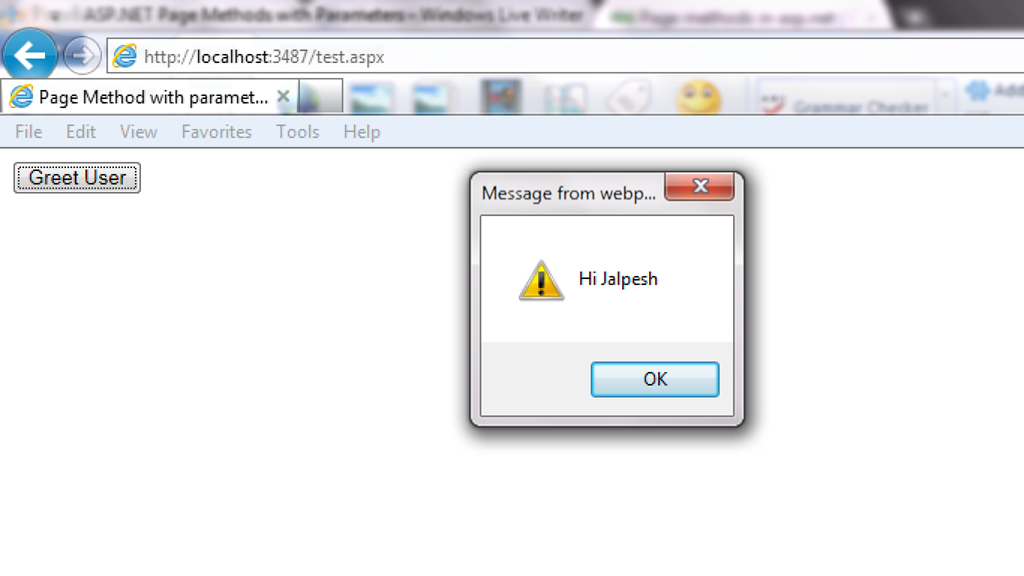
As you can see from above code I have enabled page methods true with script manager  and then  I have called JavaScript function “GreetingsFromServer” on button client click. So it’s now time to run this code in browser. Following is output as expected.
PageMethodWithParameter
That’s it. It’s very easy hope you liked it..Stay tuned for more…Happy programming

http://weblogs.asp.net/jalpeshpvadgama/archive/2012/01/07/asp-net-page-methods-with-parameters.aspx

Wednesday, 1 January 2014

Table of Contents

Can you explain ASP.NET application and page life cycle-(Demo, in which event we should do what) Part 3?

Introduction

In this article, we will try to understand what the different events are which take place right from the time the user sends a request, until the time the request is rendered on the browser. So we will first try to understand the two broader steps of an ASP.NET request and then we will move into different events emitted from ‘HttpHandler’, ‘HttpModule’ and ASP.NET page object. As we move in this event journey, we will try to understand what kind of logic should go in each and every one of these events.
This is a small Ebook for all my .NET friends which covers topics like WCF, WPF, WWF, Ajax, Core .NET, SQL, etc. You can download the same from here or else you can catch me on my daily free training here.

The Two Step Process

From 30,000 feet level, ASP.NET request processing is a 2 step process as shown below. User sends a request to the IIS:
  • ASP.NET creates an environment which can process the request. In other words, it creates the application object, request, response and context objects to process the request.
  • Once the environment is created, the request is processed through a series of events which is processed by using modules, handlers and page objects. To keep it short, let's name this step as MHPM (Module, handler, page and Module event), we will come to details later.

In the coming sections, we will understand both these main steps in more detail.

Creation of ASP.NET Environment

Step 1: The user sends a request to IIS. IIS first checks which ISAPI extension can serve this request. Depending on file extension the request is processed. For instance, if the page is an ‘.ASPX page’, then it will be passed to ‘aspnet_isapi.dll’ for processing.

Step 2: If this is the first request to the website, then a class called as ‘ApplicationManager’ creates an application domain where the website can run. As we all know, the application domain creates isolation between two web applications hosted on the same IIS. So in case there is an issue in one app domain, it does not affect the other app domain.

Step 3: The newly created application domain creates hosting environment, i.e. the ‘HttpRuntime’ object. Once the hosting environment is created, the necessary core ASP.NET objects like ‘HttpContext’ , ‘HttpRequest’ and ‘HttpResponse’ objects are created.

Step 4: Once all the core ASP.NET objects are created, ‘HttpApplication’ object is created to serve the request. In case you have a ‘global.asax’ file in your system, then the object of the ‘global.asax’ file will be created. Please note global.asax file inherits from ‘HttpApplication’ class.
Note: The first time an ASP.NET page is attached to an application, a new instance of ‘HttpApplication’ is created. Said and done to maximize performance, HttpApplication instances might be reused for multiple requests.

Step 5: The HttpApplication object is then assigned to the core ASP.NET objects to process the page.

Step 6: HttpApplication then starts processing the request by HTTP module events, handlers and page events. It fires the MHPM event for request processing.
Note: For more details, read this.

The below image explains how the internal object model looks like for an ASP.NET request. At the top level is the ASP.NET runtime which creates an ‘Appdomain’ which in turn has ‘HttpRuntime’ with ‘request’, ‘response’ and ‘context’ objects.

Process Request using MHPM Events Fired

Once ‘HttpApplication’ is created, it starts processing requests. It goes through 3 different sections ‘HttpModule’ , ‘Page’ and ‘HttpHandler’. As it moves through these sections, it invokes different events which the developer can extend and add customize logic to the same.
Before we move ahead, let's understand what are ‘HttpModule’ and ‘HttpHandlers’. They help us to inject custom logic before and after the ASP.NET page is processed. The main differences between both of them are:
  • If you want to inject logic based in file extensions like ‘.ASPX’, ‘.HTML’, then you use ‘HttpHandler’. In other words, ‘HttpHandler’ is an extension based processor.
  • If you want to inject logic in the events of ASP.NET pipleline, then you use ‘HttpModule’. ASP.NET. In other words, ‘HttpModule’ is an event based processor.
You can read more about the differences from here.
Below is the logical flow of how the request is processed. There are 4 important steps MHPM as explained below:

Step 1(M: HttpModule): Client request processing starts. Before the ASP.NET engine goes and creates the ASP.NET HttpModule emits events which can be used to inject customized logic. There are 6 important events which you can utilize before your page object is created BeginRequest, AuthenticateRequest, AuthorizeRequest, ResolveRequestCache, AcquireRequestState and PreRequestHandlerExecute.

Step 2 (H: ‘HttpHandler’): Once the above 6 events are fired, ASP.NET engine will invoke ProcessRequest event if you have implemented HttpHandler in your project.

Step 3 (P: ASP.NET page): Once the HttpHandler logic executes, the ASP.NET page object is created. While the ASP.NET page object is created, many events are fired which can help us to write our custom logic inside those page events. There are 6 important events which provides us placeholder to write logic inside ASP.NET pages Init, Load, validate, event, render and unload. You can remember the word SILVER to remember the events S – Start (does not signify anything as such just forms the word) , I – (Init) , L (Load) , V (Validate), E (Event) and R (Render).

Step4 (M: HttpModule): Once the page object is executed and unloaded from memory, HttpModule provides post page execution events which can be used to inject custom post-processing logic. There are 4 important post-processing events PostRequestHandlerExecute, ReleaserequestState, UpdateRequestCache and EndRequest.
The below figure shows the same in a pictorial format.

In What Event Should We Do What?

The million dollar question is in which events should we do what? Below is the table which shows in which event what kind of logic or code can go.
Section Event Description
HttpModule BeginRequest This event signals a new request; it is guaranteed to be raised on each request.
HttpModule AuthenticateRequest This event signals that ASP.NET runtime is ready to authenticate the user. Any authentication code can be injected here.
HttpModule AuthorizeRequest This event signals that ASP.NET runtime is ready to authorize the user. Any authorization code can be injected here.
HttpModule ResolveRequestCache In ASP.NET, we normally use outputcache directive to do caching. In this event, ASP.NET runtime determines if the page can be served from the cache rather than loading the patch from scratch. Any caching specific activity can be injected here.
HttpModule AcquireRequestState This event signals that ASP.NET runtime is ready to acquire session variables. Any processing you would like to do on session variables.
HttpModule PreRequestHandlerExecute This event is raised just prior to handling control to the HttpHandler. Before you want the control to be handed over to the handler any pre-processing you would like to do.
HttpHandler ProcessRequest Httphandler logic is executed. In this section, we will write logic which needs to be executed as per page extensions.
Page Init This event happens in the ASP.NET page and can be used for:
  • Creating controls dynamically, in case you have controls to be created on runtime.
  • Any setting initialization.
  • Master pages and the settings.
In this section, we do not have access to viewstate, postedvalues and neither the controls are initialized.
Page Load In this section, the ASP.NET controls are fully loaded and you write UI manipulation logic or any other logic over here.
Page Validate If you have valuators on your page, you would like to check the same here.

Render It’s now time to send the output to the browser. If you would like to make some changes to the final HTML which is going out to the browser, you can enter your HTML logic here.
Page Unload Page object is unloaded from the memory.
HttpModule PostRequestHandlerExecute Any logic you would like to inject after the handlers are executed.
HttpModule ReleaserequestState If you would like to save update some state variables like session variables.
HttpModule UpdateRequestCache Before you end, if you want to update your cache.
HttpModule EndRequest This is the last stage before your output is sent to the client browser.

A Sample Code for Demonstration

With this article, we have attached a sample code which shows how the events actually fire. In this code, we have created a ‘HttpModule’ and ‘Httphandler’ in this project and we have displayed a simple response write in all events, below is how the output looks like.
Below is the class for ‘HttpModule’ which tracks all events and adds it to a global collection.
public class clsHttpModule : IHttpModule
{
...... 
void OnUpdateRequestCache(object sender, EventArgs a)
{
objArrayList.Add("httpModule:OnUpdateRequestCache");
}
void OnReleaseRequestState(object sender, EventArgs a)
{
objArrayList.Add("httpModule:OnReleaseRequestState");
}
void OnPostRequestHandlerExecute(object sender, EventArgs a)
{
objArrayList.Add("httpModule:OnPostRequestHandlerExecute");
}
void OnPreRequestHandlerExecute(object sender, EventArgs a)
{
objArrayList.Add("httpModule:OnPreRequestHandlerExecute");
}
void OnAcquireRequestState(object sender, EventArgs a)
{
objArrayList.Add("httpModule:OnAcquireRequestState");
}
void OnResolveRequestCache(object sender, EventArgs a)
{
objArrayList.Add("httpModule:OnResolveRequestCache");
}
void OnAuthorization(object sender, EventArgs a)
{
objArrayList.Add("httpModule:OnAuthorization");
}
void OnAuthentication(object sender, EventArgs a)
{

objArrayList.Add("httpModule:AuthenticateRequest");
}
void OnBeginrequest(object sender, EventArgs a)
{

objArrayList.Add("httpModule:BeginRequest");
}
void OnEndRequest(object sender, EventArgs a)
{
objArrayList.Add("httpModule:EndRequest");
objArrayList.Add("<hr>");
foreach (string str in objArrayList)
{
httpApp.Context.Response.Write(str + "<br>") ;
}
} 
}
Below is the code snippet for ‘HttpHandler’ which tracks ‘ProcessRequest’ event.
public class clsHttpHandler : IHttpHandler
{
public void ProcessRequest(HttpContext context)
{
clsHttpModule.objArrayList.Add("HttpHandler:ProcessRequest");
context.Response.Redirect("Default.aspx");
}
}
We are also tracking all the events from the ASP.NET page.
public partial class _Default : System.Web.UI.Page 
{
protected void Page_init(object sender, EventArgs e)
{

clsHttpModule.objArrayList.Add("Page:Init");
}
protected void Page_Load(object sender, EventArgs e)
{
clsHttpModule.objArrayList.Add("Page:Load");
}
public override void Validate() 
{
clsHttpModule.objArrayList.Add("Page:Validate");
}
protected void Button1_Click(object sender, EventArgs e)
{
clsHttpModule.objArrayList.Add("Page:Event");
}
protected override void Render(HtmlTextWriter output) 
{
clsHttpModule.objArrayList.Add("Page:Render");
base.Render(output);
}
protected void Page_Unload(object sender, EventArgs e)
{
clsHttpModule.objArrayList.Add("Page:UnLoad");
}}
Below is how the display looks like with all events as per the sequence discussed in the previous section.

Zooming ASP.NET Page Events

In the above section, we have seen the overall flow of events for an ASP.NET page request. One of the most important sections is the ASP.NET page, we have not discussed the same in detail. So let’s take some luxury to describe the ASP.NET page events in more detail in this section.
Any ASP.NET page has 2 parts, one is the page which is displayed on the browser which has HTML tags, hidden values in form of viewstate and data on the HTML inputs. When the page is posted, these HTML tags are created in to ASP.NET controls with viewstate and form data tied up together on the server. Once you get these full server controls on the behind code, you can execute and write your own login on the same and render the page back to the browser.

Now between these HTML controls coming live on the server as ASP.NET controls, the ASP.NET page emits out lot of events which can be consumed to inject logic. Depending on what task / logic you want to perform, we need to put this logic appropriately in those events.
Note: Most of the developers directly use the page_load method for everything, which is not a good thought. So it’s either populating the controls, setting view state, applying themes, etc., everything happens on the page load. So if we can put logic in proper events as per the nature of the logic, that would really make your code clean.
Seq Events Controls Initialized View state
Available
Form data
Available
What Logic can be written here?
1 Init No No No Note: You can access form data etc. by using ASP.NET request objects but not by Server controls.Creating controls dynamically, in case you have controls to be created on runtime. Any setting initialization.Master pages and them settings. In this section, we do not have access to viewstate , posted values and neither the controls are initialized.
2 Load view state Not guaranteed Yes Not guaranteed You can access view state and any synch logic where you want viewstate to be pushed to behind code variables can be done here.
3 PostBackdata Not guaranteed Yes Yes You can access form data. Any logic where you want the form data to be pushed to behind code variables can be done here.
4 Load Yes Yes Yes This is the place where you will put any logic you want to operate on the controls. Like flourishing a combobox from the database, sorting data on a grid, etc. In this event, we get access to all controls, viewstate and their posted values.
5 Validate Yes Yes Yes If your page has validators or you want to execute validation for your page, this is the right place to the same.
6 Event Yes Yes Yes If this is a post back by a button click or a dropdown change, then the relative events will be fired. Any kind of logic which is related to that event can be executed here.
7 Pre-render Yes Yes Yes If you want to make final changes to the UI objects like changing tree structure or property values, before these controls are saved in to view state.
8 Save view state Yes Yes Yes Once all changes to server controls are done, this event can be an opportunity to save control data in to view state.
9 Render Yes Yes Yes If you want to add some custom HTML to the output this is the place you can.
10 Unload Yes Yes Yes Any kind of clean up you would like to do here.

About the Source Code

This source code shows how the complete ASP.NET request cycle fires. You can download it from here.

References

I am not so smart to write this article by myself Wink | ;-) , lot of things I have plugged from the below articles.

Tuesday, 19 November 2013

XML and XSL Tutorial

 XML and XSL Tutorial with Example..


Tutorial1.xml

<?xml version="1.0" encoding="utf-8" ?>
<?xml-stylesheet type="text/xsl" href="tvshows.xsl" ?>
<TvShows>
<Shows>
  <name>Utaran</name>
  <release>2005</release>
  <enddate>2009</enddate>
  <network country="India">Star Plus</network>
  <poster href="http://www.cinejosh.com/gallereys/bollywood/normal/uttaran_serial_1000_episodes_completion_party_0911120942/uttaran_serial_1000_episodes_completion_party_0911120942_034.jpg"></poster>
  <viewers units="millions">7.82</viewers>
</Shows>
  <Shows>
    <name>Dance India Dance</name>
    <release>2006</release>
    <enddate>2013</enddate>
    <network country="India">Colors</network>
    <poster href="http://upload.wikimedia.org/wikipedia/en/thumb/4/45/Dance_India_Dance_Judges.jpg/290px-Dance_India_Dance_Judges.jpg"></poster>
    <viewers units="millions">15.82</viewers>
  </Shows>
  <Shows>
    <name>Kahaani Ghar Ghar Ki</name>
    <release>2007</release>
    <enddate>2013</enddate>
    <network country="India">Colors</network>
    <poster href="http://media.startv.in/newstream/star/starplus/kahani_ghar_ghar_ki/1651/kahani_ghar_ghar_ki_ep1651_300x200.jpg"></poster>
    <viewers units="millions">2.82</viewers>
  </Shows>

</TvShows>


TVShows.XSL  File

<?xml version="1.0" encoding="utf-8" ?>
<xsl:stylesheet version="1.0" xmlns:xsl="http://www.w3.org/1999/XSL/Transform">

  <xsl:output method="html"/>
  <xsl:template match="/">

    <html>
      <head>
        <title>TV Shows</title></head>
      <body>
        Version: <xsl:value-of select="system-property('xsl:version')"/><br />
        Vendor: <xsl:value-of select="system-property('xsl:vendor')"/><br />
        Vendor URL: <xsl:value-of select="system-property('xsl:vendor-url')"/><br />

        <xsl:for-each select="TvShows/Shows">

          <a href="#{generate-id(name)}">
            <xsl:value-of select="name"/>
          </a><br/>
    </xsl:for-each>


        <xsl:for-each select="TvShows/Shows">
          <xsl:sort select="name" order="ascending" data-type="text"/>
          <h3>
            <a name="{generate-id(name)}">
              <xsl:value-of select="name"/>
            </a>
          </h3>
          <img>
            <xsl:attribute name="src">
              <xsl:value-of select="poster/@href"/>
            </xsl:attribute>
          </img>
          <br/>

          <xsl:value-of select="current()"/> <br/>

          <p> The show <xsl:value-of select="name"/> was
          released in <xsl:value-of select="release"/> by
          <xsl:value-of select="network"/>. It had an average viewership
          of <xsl:value-of select="viewers"/> million people. It was
          cancelled in <xsl:value-of select="enddate"/>
        </p> <br/>
   </xsl:for-each>

        <table border="2">
          <tr><th>Name</th><th>Network</th><th>Viewers</th></tr>
          <xsl:for-each select="TvShows/Shows">
            <xsl:if test="release &lt; 2006">
              <tr bgcolor="red">
                <td><xsl:value-of select="name"/></td>
                <td><xsl:value-of select="network"/></td>
                <td><xsl:value-of select="viewers"/></td>
              </tr>
            </xsl:if>
              <xsl:choose>

                <xsl:when test="release>2006">
                  <tr bgcolor="yellow">
                      <td><xsl:value-of select="name"/></td>
                      <td><xsl:value-of select="network"/></td>
                      <td><xsl:value-of select="viewers"/></td>
                   </tr>
                </xsl:when>


                <xsl:when test="release=2006">
                  <tr bgcolor="orange">
                    <td><xsl:value-of select="name"/></td>
                    <td><xsl:value-of select="network"/></td>
                    <td><xsl:value-of select="viewers"/></td>
                  </tr>
                </xsl:when>
                <xsl:otherwise>
                  <tr bgcolor="pink">
                    <td><xsl:value-of select="name"/></td>
                    <td><xsl:value-of select="network"/></td>
                    <td><xsl:value-of select="viewers"/></td>
                  </tr>
             </xsl:otherwise>
              </xsl:choose>
           </xsl:for-each>
         
        </table>
       
      </body>
    </html>
   
  </xsl:template>
</xsl:stylesheet>


OUTPUT


Version: 1.0
Vendor: libxslt
Vendor URL: http://xmlsoft.org/XSLT/
Utaran
Dance India Dance
Kahaani Ghar Ghar Ki

Dance India Dance


Dance India Dance 2006 2013 Colors 15.82 
The show Dance India Dance was released in 2006 by Colors. It had an average viewership of 15.82 million people. It was cancelled in 2013

Kahaani Ghar Ghar Ki


Kahaani Ghar Ghar Ki 2007 2013 Colors 2.82 
The show Kahaani Ghar Ghar Ki was released in 2007 by Colors. It had an average viewership of 2.82 million people. It was cancelled in 2013

Utaran


Utaran 2005 2009 Star Plus 7.82 
The show Utaran was released in 2005 by Star Plus. It had an average viewership of 7.82 million people. It was cancelled in 2009

NameNetworkViewers
UtaranStar Plus7.82
UtaranStar Plus7.82
Dance India DanceColors15.82
Kahaani Ghar Ghar KiColors2.82


Sunday, 10 November 2013

COALESCE (Transact-SQL)

COALESCE (Transact-SQL)

SQL Server 2012
Evaluates the arguments in order and returns the current value of the first expression that initially does not evaluate to NULL.
Applies to: SQL Server (SQL Server 2008 through current version), Windows Azure SQL Database (Initial release through current release).
Topic link icon Transact-SQL Syntax Conventions

COALESCE ( expression [ ,...n ] ) 

expression
Is an expression of any type.
Returns the data type of expression with the highest data type precedence. If all expressions are nonnullable, the result is typed as nonnullable.
If all arguments are NULL, COALESCE returns NULL. At least one of the null values must be a typed NULL.

Comparing COALESCE and CASE

The COALESCE expression is a syntactic shortcut for the CASE expression. That is, the code COALESCE(expression1,...n) is rewritten by the query optimizer as the following CASE expression:
CASE
   WHEN (expression1 IS NOT NULL) THEN expression1
   WHEN (expression2 IS NOT NULL) THEN expression2
   ...
   ELSE expressionN
END
This means that the input values (expression1, expression2, expressionN, etc.) will be evaluated multiple times. Also, in compliance with the SQL standard, a value expression that contains a subquery is considered non-deterministic and the subquery is evaluated twice. In either case, different results can be returned between the first evaluation and subsequent evaluations.
For example, when the code COALESCE((subquery), 1) is executed, the subquery is evaluated twice. As a result, you can get different results depending on the isolation level of the query. For example, the code can return NULL under the READ COMMITTED isolation level in a multi-user environment. To ensure stable results are returned, use the SNAPSHOT ISOLATION isolation level, or replace COALESE with the ISNULL function. Alternatively, you can rewrite the query to push the subquery into a subselect as shown in the following example.
SELECT CASE WHEN x IS NOT NULL THEN x ELSE 1 END
FROM
(
SELECT (SELECT Nullable FROM Demo WHERE SomeCol = 1) AS x
) AS T;

Comparing COALESCE and ISNULL

The ISNULL function and the COALESCE expression have a similar purpose but can behave differently.
  1. Because ISNULL is a function, it is evaluated only once. As described above, the input values for the COALESCE expression can be evaluated multiple times.
  2. Data type determination of the resulting expression is different. ISNULL uses the data type of the first parameter, COALESCE follows the CASE expression rules and returns the data type of value with the highest precedence.
  3. The NULLability of the result expression is different for ISNULL and COALESCE. The ISNULL return value is always considered NOT NULLable (assuming the return value is a non-nullable one) whereas COALESCE with non-null parameters is considered to be NULL. So the expressions ISNULL(NULL, 1) and COALESCE(NULL, 1) although equivalent have different nullability values. This makes a difference if you are using these expressions in computed columns, creating key constraints or making the return value of a scalar UDF deterministic so that it can be indexed as shown in the following example.
    USE tempdb;
    GO
    -- This statement fails because the PRIMARY KEY cannot accept NULL values
    -- and the nullability of the COALESCE expression for col2 
    -- evaluates to NULL.
    CREATE TABLE #Demo 
    ( 
    col1 integer NULL, 
    col2 AS COALESCE(col1, 0) PRIMARY KEY, 
    col3 AS ISNULL(col1, 0) 
    ); 
    
    -- This statement succeeds because the nullability of the 
    -- ISNULL function evaluates AS NOT NULL.
    
    CREATE TABLE #Demo 
    ( 
    col1 integer NULL, 
    col2 AS COALESCE(col1, 0), 
    col3 AS ISNULL(col1, 0) PRIMARY KEY 
    );
    
  4. Validations for ISNULL and COALESCE are also different. For example, a NULL value for ISNULL is converted to int whereas for COALESCE, you must provide a data type.
  5. ISNULL takes only 2 parameters whereas COALESCE takes a variable number of parameters.

A. Running a simple example

The following example shows how COALESCE selects the data from the first column that has a nonnull value. This example uses the AdventureWorks2012 database.
SELECT Name, Class, Color, ProductNumber,
COALESCE(Class, Color, ProductNumber) AS FirstNotNull
FROM Production.Product;

B. Running a complex example

In the following example, the wages table includes three columns that contain information about the yearly wages of the employees: the hourly wage, salary, and commission. However, an employee receives only one type of pay. To determine the total amount paid to all employees, use COALESCE to receive only the nonnull value found in hourly_wage, salary, and commission.
SET NOCOUNT ON;
GO
USE tempdb;
IF OBJECT_ID('dbo.wages') IS NOT NULL
    DROP TABLE wages;
GO
CREATE TABLE dbo.wages
(
    emp_id        tinyint   identity,
    hourly_wage   decimal   NULL,
    salary        decimal   NULL,
    commission    decimal   NULL,
    num_sales     tinyint   NULL
);
GO
INSERT dbo.wages (hourly_wage, salary, commission, num_sales)
VALUES
    (10.00, NULL, NULL, NULL),
    (20.00, NULL, NULL, NULL),
    (30.00, NULL, NULL, NULL),
    (40.00, NULL, NULL, NULL),
    (NULL, 10000.00, NULL, NULL),
    (NULL, 20000.00, NULL, NULL),
    (NULL, 30000.00, NULL, NULL),
    (NULL, 40000.00, NULL, NULL),
    (NULL, NULL, 15000, 3),
    (NULL, NULL, 25000, 2),
    (NULL, NULL, 20000, 6),
    (NULL, NULL, 14000, 4);
GO
SET NOCOUNT OFF;
GO
SELECT CAST(COALESCE(hourly_wage * 40 * 52, 
   salary, 
   commission * num_sales) AS money) AS 'Total Salary' 
FROM dbo.wages
ORDER BY 'Total Salary';
GO
Here is the result set.
Total Salary
------------
10000.00
20000.00
20800.00
30000.00
40000.00
41600.00
45000.00
50000.00
56000.00
62400.00
83200.00
120000.00
(12 row(s) affected)

Tuesday, 29 October 2013

Converting Words to Number in Sql Server

 
--select CHARINDEX('HUNDRED',replace(replace('FOUR HUNDRED FIFTY - ONE THOUSAND TWO HUNDRED THIRTY - FOUR','-',''),' ',''))
--select replace(replace(replace(replace('FOUR HUNDRED FIFTY - ONE THOUSAND TWO HUNDRED THIRTY - FOUR','-','|'),' ',''),'HUNDRED','|'),'THOUSAND','|')
DECLARE @count int ,@i int, @Finalno varchar(50),@no varchar(10)
Set @count = 0
set @i=0
set @Finalno=''
select @count = MAX(id) from SplitPIPESep(replace(replace(replace(replace(replace('ONE THOUSAND TWO HUNDRED ELEVEN','-','|'),' ',''),'MILLION','|'),'HUNDRED','|'),'THOUSAND','|'))

While @i < @count
Begin
    select @no = Convert(varchar(10),number)
    from (select id,seccontion from SplitPIPESep(replace(replace(replace(replace(replace('ONE THOUSAND TWO HUNDRED ELEVEN','-','|'),' ',''),'MILLION','|'),'HUNDRED','|'),'THOUSAND','|'))) a
    inner join NumTowordMaster  b on b.words = a.seccontion
    where a.id=@i+1   
    SET @Finalno = @Finalno + @no   
    Set @i= @i +1
end
    select @Finalno


SET ANSI_NULLS ON
GO
SET QUOTED_IDENTIFIER ON
GO
-- =============================================
-- Author:        <Author,,Narendra Kushwaha>
-- Create date: <Create Date, 29-10-2013>
-- Description:    <Description, ,>
-- =============================================
CREATE FUNCTION [dbo].[SplitPIPESep]
(
    -- Add the parameters for the function here
    @list nvarchar(MAX)
)
RETURNS varchar(max)
AS
BEGIN
    -- Declare the return variable here
    DECLARE @NUMBER varchar(max), @pos int, 
           @nextpos int, 
           @value varchar(10),@valuedig varchar(10)
 
   SELECT @pos = 0, @nextpos = 1 
 
   WHILE @nextpos > 0 
   BEGIN 
      SELECT @nextpos = charindex('|', @list, @pos + 1) 
      SELECT @valuedig = Convert(varchar(10),number) From NumTowordMaster Where words = LTRIM(Rtrim(@nextpos))
      SET @value = @value + @valuedig
      select @value
   END 

    -- Add the T-SQL statements to compute the return value here
    SELECT <@ResultVar, sysname, @Result> = <@Param1, sysname, @p1>

    -- Return the result of the function
    RETURN @NUMBER

END
GO

Data Contained in Table NumTowordMaster 

C# LINQ Joins With SQL

There are  Different Types of SQL Joins  which are used to query data from more than one database tables. In this article, you will learn a...